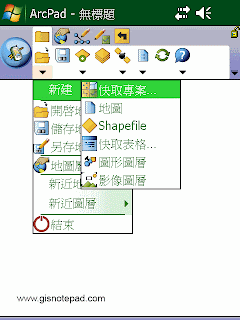
 New 新建
Display a submenu for creating a new QuickProject, map, shapefile, QuickForm, graphics layer, or photo layer. 顯示新建快取專案、地圖、 Shapefile、快取表格、圖形圖層、影像圖層的子功能表.
 Open Map 開啟地圖
Open an ArcPad map (a file with an .apm extension). 開啓ArcPad 地圖( .apm 文件).
 |
| Step1 點選[開啟地圖] |
 |
| Step2 在[開啟地圖]對話框,選取要開啟的地圖專案檔(.apm),按[OK]。 |
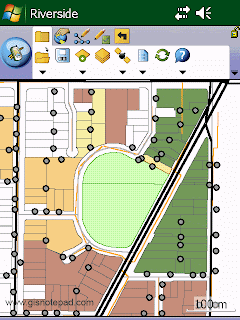 |
| Step3 地圖匯入完成 |
 Save Map 儲存地圖
Save the current ArcPad map. 儲存目前ArcPad地圖檔案.
 Save Map As 另存地圖
Save the current ArcPad map with a new name and/or in a different folder. 儲存目前ArcPad地圖爲新的檔案名稱或儲到別的資料夾
 |
| Step1 點選[另存地圖] |
 |
| Step2 在[另存檔案]對話框,輸入新檔名,選取資料夾名稱和位置,按[儲存]。 |
 Map Properties 地圖屬性
Open the Map Properties dialog box. 開啟地圖屬性對話盒.
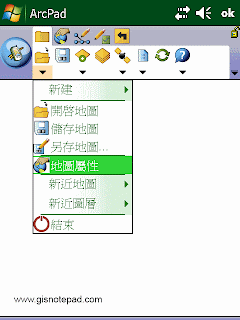 |
| Step1 點選[地圖屬性] |
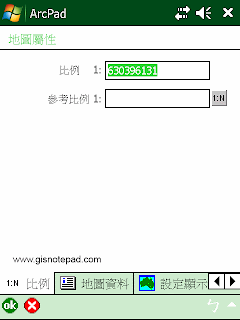 |
| Step2 在[地圖屬性]對話框,含比例、地圖資料 、 設定顯示範圍坐標 、 書籤 、 投影資訊等分頁 |
 Recent Maps 最近開啟的地圖
Display the nine most recently opened maps. 顯示最近開啟的9個地圖檔案
 Recent Layers 最近開啟的圖層
Display the nine most recently added layers. 顯示最近增加的9個圖層
 Exit 關閉
Close ArcPad. 關閉ArcPad
Reference to ESRI® ArcPad® 10 Quick Reference