 Zoom In 放大
Zoom in on the map using the stylus. 用觸控筆點一下或框選螢幕,來放大地圖
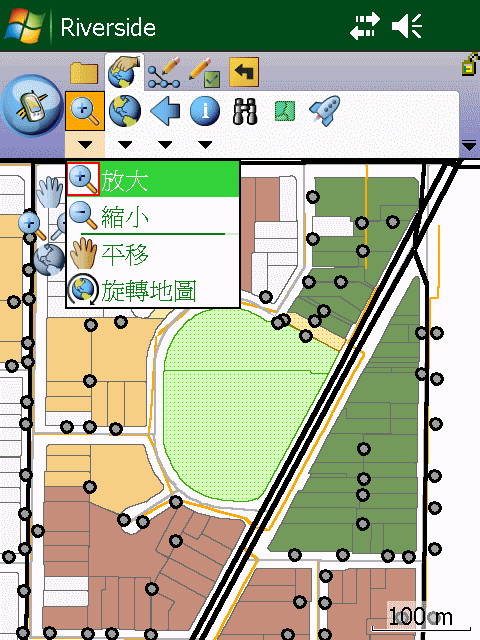 |
| Step1 點選 [放大] |
 |
| Step2 用觸控筆框選要放大範圍 |
 |
| Step3 地圖放大完成 |
 Zoom Out 縮小
Zoom out on the map using the stylus. 用觸控筆 點一下或框選螢幕,來縮小地圖
 |
| Step1 點選 [縮小] |
 |
| Step2 用觸控筆框選要縮小範圍 |
 |
| Step3 地圖縮小完成 |
 Pan 平移
Pan the map using the stylus. 用觸控筆平移地圖
 |
| Step1 點選[平移] |
 |
| Step2 用觸控筆移動地圖 |
 |
| Step3 地圖移動完成 |
 Rotate Map 旋轉地圖
Set the map rotation angle. 設定地圖旋轉角度
 |
| Step1 點選[旋轉地圖] |
 |
| Step2 觸控筆畫圓,決定要旋轉角度 |
 |
| Step3 地圖旋轉完成 |
Reference to ESRI® ArcPad® 10 Quick Reference